


How To Check Mobile Number In Airtel, Reliance, Aircel, Vodafone
Posted On //
Leave a Comment
How To Check Mobile Number In Airtel , Reliance , Aircel , Vodafone , Bsnl etc

Some times you forget your phone number and you dont have any balance in your phone or you have many sim cards and you are not able to remember them easly so today i will show you how you can check your mobile number in Airtel, Vodafone, Idea, Relaince, Aircel, Bsnl, Vigin and uninor.
| Network Provider | Dial Code |
|---|---|
| Idea | *789# or *100# or *1# *147# *131# or *131*1# |
| Vodafone | *555# or *555*0# or *111*2# or *777*0# or *131*0# |
| Airtel | *140*175 or*140*1600# or *121*9# or *282# *141*123# |
| Aircel | *1# or *234*4# or *888# or *122*131# or *131# |
| Reliance | *1# *111# |
| Bsnl | *1# or *99# |
| Videocon | *1# |
| Virgin | *1# or SMS: NUM to 51230 or *1# |
| Tata Docomo | *1# or *580# or *124# |
| Uninor | *444# *555# *1# |
How to Disable Comments on Blogger Pages
Posted On //
Leave a Comment
How to Disable Comments on Blogger Pages
When you create any page on blogger, the comments are enabled by default. But some pages like about us, contact us, privacy policy and sitemap pages don’t need comments and so you need to disable comments, Which is quite easy and Today in this tutrorial i will show you how you can disable comments on blogger pages.To disable comments,Login to your blogger account and follow the steps below:
1. Pages >> Select any page >> Options
2. Under 'Reader comments' section you see the following three options as shown in pic below.

- Allow: This option will Show comments in pages
- Don't allow, show existing: this optin will not allow comments in pages and will display the previous comments.
- Don't allow, hide existing: This optin will not allow comments in pagtes and also will hide the previous comments.
Now select the third option 'Don't allow, hide existing' and press 'Done', Then non of the user will be able to comment in that page
Hope you it would have helped you to understand the tutorial Better, So keep visiting the blog and do share it with your friends on facebook twitter and google plus...Thanks
Best Social Follow Widget For Blogger
Posted On //
3 comments
Best Social Follow Widget For Blogger

All of you want to get huge amount of fans to your facebook pages and huge followers to your twitter and Google Plus and there are so many ways for that, You may buy or may invite but one of the best way to increase social followers is with your blog or a website. If you have a blogger blog i will share a simple social follow widget which you can add to your blogger blog easly and increase the fans and followers.
How To Add Social Follow Widget I Blogger:
1. Blogger Dashboard >> Layout
2. Add Gadget >> HTML/JavaScript
3. Now in this box copy past the below Code
NOTE: Replace Above Text In Red With your facebook, Twitter, feedburner and Google plus username<style>
#wc-rotico
{
background:#ffffff;
border:1px solid #dcdcdc;
padding:10px;
box-shadow:1px 1px 4px #dcdcdc;
-moz-box-shadow:1px 1px 4px #dcdcdc;
-web-kit-box-shadow:1px 1px 4px #dcdcdc;
-goog-ms-box-shadow:1px 1px 4px #dcdcdc;
}
#wc-rotico img{
-moz-transition: all 1s ease-in-out;
-webkit-transition: all 1s ease-in-out;
-o-transition: all 1s ease-in-out;
-ms-transition: all 1s ease-in-out;
transition: all 1s ease-in-out;
}
#wc-rotico img:hover{
-moz-transform: rotate(360deg);
-webkit-transform: rotate(360deg);
-o-transform: rotate(360deg);
-ms-transform: rotate(360deg);
transform: rotate(360deg);
}
</style>
<div id="wc-rotico">
<a href='http://www.facebook.com/tricksdonor.org' target='_blank' rel="nofollow">
<img border="0" src="http://4.bp.blogspot.com/-FLrQQv4zXYY/Uh3H5HMmtLI/AAAAAAAACSo/CNjUCyfZY9E/s1600/Facebook.png" /></a>
<td valign="top" width="33"><a href='https://twitter.com/faheembashir10' target='_blank' rel="nofollow">
<img border="0" src="http://2.bp.blogspot.com/-zsElLEeWt_s/Uh3H7UcozEI/AAAAAAAACTE/wuU-BI1CZAc/s1600/Twitter.png" /></a>
<a href='http://feeds.feedburner.com/tricksdonor/QrdO' target='_blank' rel="nofollow">
<img border="0" src="http://4.bp.blogspot.com/-i8XfPimO5lo/Uh3H7NLikpI/AAAAAAAACTA/b81bQXaDtVM/s1600/RSS.png" /></a>
<a href='https://plus.google.com/116197187007951085311' target='_blank' rel="nofollow">
<img border="0" src="http://4.bp.blogspot.com/-aBIFDEM9KR8/Uh3H5tRMZQI/AAAAAAAACS0/z6u6L8WXFgY/s1600/Google+plus.png" /></a>
<a href="#" target='_blank' rel="nofollow">
<img border="0" src="http://2.bp.blogspot.com/-YFcScg8c5M8/Uh3H5QygjhI/AAAAAAAACSs/vvGO9oPWwZs/s1600/LinkedIn.png" /></a>
</td></div>
How To Get Your Blog Post Indexed By Google In a Minute
Posted On //
1 comment
How To Get Your Blog Post Indexed By Google In a Minute
I stared blogging some months before and posting regularly.After adding my blog to Google webmaster Tools. After sharing any post i used to search my shared posts in google but it was not appearing in the search results. I had some blogs in my reading list and there posts are indexed by google in a Minute, Then a friend told me how you can get your blog post indexed by google in a Minute and today i will share it with you.How To Get Your Blog Post Indexed:
1. After successfully adding your blog or website to Google Webmaster tools. You can see Crawl option in left side, under that click on Fetch as Google. Enter your post url slelect Web and click on Fetch.

2. Now page will refresh and submit to index button will appear next to your post url as shown in pic below

3. Click on it a popup box will appear asking whether you submit post url or all the urls linked to this post as shown in pic below

Thanks for visiting and reading the blog. I hope you enjoyed this tutorial and it idf you have any questions related this or any post then please comment. keep visiting our blog and do share this post with your friends on facebook twitter and google plus..
How To Create Stylish Sitemap Page in Blogger
Posted On //
1 comment

How To Create Stylish Sitemap Page in Blogger
Hello friends, Today in this tutorial i will show you how to create a stylish SiteMap page for your blogger blog,Which will contain all of your posts and will automatically update when you update the blog, Which will help you to increase internal links and it also helps search engine's crawler to index the content easier but before moving to tutorial you should know what SiteMap is.What Is SiteMap?
The sitemap is a very important and necessary component in each website. In short, the sitemap is an index page of your website, which offers links to all pages of your website. These links are categorized and organized in hierarchical form, which makes finding them very easy.
How To Create Sitemap Page in Blogger
How To Create Sitemap Page in Blogger
1. Go To Blogger > Dashboard > Pages
2. Create New Page > Blank Page

3. Page Title your Choice.
4. Go To HTML Tab And Past The Below Code In It.

NOTE:<style type="text/css">
#toc{
width:99%;
margin:5px auto;
border:1px solid #2D96DF;
-webkit-box-shadow:4px 4px 8px 2px rgba(0,0,0, 0.2);
-moz-box-shadow:4px 4px 8px 2px rgba(0,0,0, 0.2);
box-shadow:4px 4px 8px 2px rgba(0,0,0, 0.2);
}
.labl{
color:#FF5F00;
font-weight:bold;
margin:0 -5px;
padding:1px 0 2px 11px;
background:-moz-linear-gradient(right,#C2EAFE 0%,#055A85 40%);
background:-webkit-gradient(linear,left 10,right 80,color-stop(0.20,#055A85),color-stop(1,#C2EAFE));
border:1px solid #2D96DF;
border-radius:4px;-moz-border-radius:4px;
-webkit-border-radius:4px;box-shadow:3px 3px 1px #bbb;
-moz-box-shadow:3px 3px 1px #bbb;-webkit-box-shadow:3px 3px 1px #bbb;display:block;
}
.labl a{
color:#fff;
}
.labl:first-letter{t
ext-transform:uppercase;
}
.new{
color:#FF5F00;
font-weight:bold;
font-style:italic;
}
.postname{
font-weight:normal;
background:-moz-linear-gradient(right,#C2EAFE 0%,#fff 40%);
background:-webkit-gradient(linear,left 80,right 10,color-stop(0.60,#fff),color-stop(1,#C2EAFE));
}
.postname li{
border-bottom: #ddd 1px dotted;
margin-right:5px
}
</style>
<div id="toc">
<script src="https://googledrive.com/host/0ByNodV_m9cVLR0pmWFgwZ1NmdW8/" type="text/javascript"></script>
<script src="http://www.YOURBLOGDOMAIN.com/feeds/posts/default?max-results=9999&alt=json-in-script&callback=loadtoc">
</script></div>
- Replace YOURBLOGDOMAIN With Your Blog Domain.
- Click "Publish" Button.
- And Its Done.!!!
Add Recommended For You Slide Out Widget To Blogger
Posted On //
2 comments
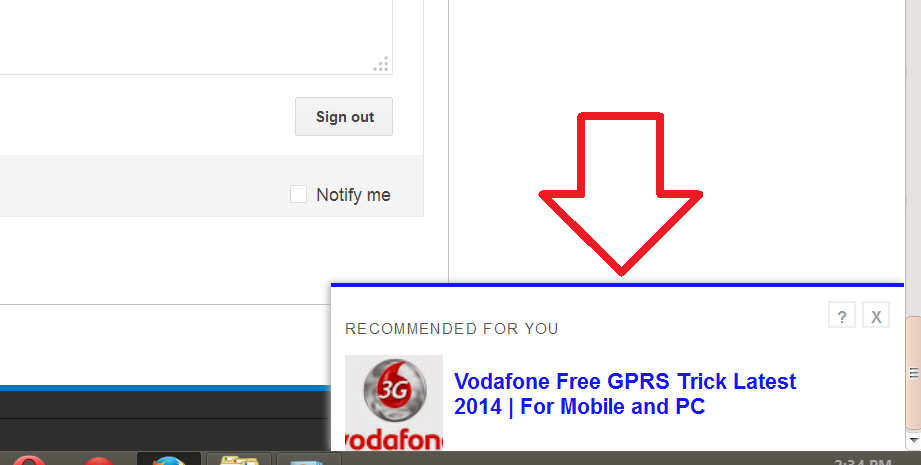
Add Recommended For You Slide Out Widget To Blogger
Recommended For You Slide Out Widget is the Best widget which you should use in your blog, When reader scrolls down the page the Recommended For You widget Slides Out in the Right bottom Corner like an invitation to your reader to read new post, and keep your visitor for a long time on your blog. which will help help you to increase traffic of your Blog.
ALSO READ:
ALSO READ:
How To Add Recommended For You Slide Out Widget To Blogger
1. Login to your blogger Dashboard and Move to Layout option.
2. Click on Add a Gadgets/Widget
3. Now select Html/Javascript option.
4. Copy & Paste the code below code in the box and Save.
Thanks for visiting and reading the blog. I hope you enjoyed this tutorial and will help you. So keep visiting our blog and do share this post with your friends on facebook twitter and google plus..<!-- Recommended For You Slide-->
<div id="bpslidein" style="display:none;"> <div class="help">?</div><div class="expand">+</div> <div class="close">X</div> <p>Recommended for you</p> <div id="bpslidein_image"></div> <div id="bpslidein_title">Loading..</div> </div> <script> if(document.location.href.split("/").length==6&&document.location.href.indexOf(".html")!=-1){if(typeof bp_onload_queue=='undefined')var bp_onload_queue=[];if(typeof bp_dom_loaded=='boolean')bp_dom_loaded=false;else var bp_dom_loaded=false;if(typeof bp_async_loader!='function'){function bp_async_loader(src,callback,id){var script=document.createElement('script');script.type="text/javascript";script.async=true;script.src=src;script.id=id;var previous_script=document.getElementById(id);if(previous_script)if(previous_script.readyState=="loaded"||previous_script.readyState=="complete"){callback();return}else{script=previous_script}if(script.onload!=null)previous_callback=script.onload;script.onload=script.onreadystatechange=function(){var newcallback;if(previous_script&&previous_callback)newcallback=function(){previous_callback();callback()};else newcallback=callback;if(bp_dom_loaded){newcallback()}else bp_onload_queue.push(newcallback);script.onload=null;script.onreadystatechange=null};var head=document.getElementsByTagName('head')[0];if(!previous_script)head.appendChild(script)}}if(typeof bp_domLoaded!='function')function bp_domLoaded(callback){bp_dom_loaded=true;var len=bp_onload_queue.length;for(var i=0;i<len;i++){bp_onload_queue[i]()}}bp_domLoaded();bp_async_loader("http://ajax.googleapis.com/ajax/libs/jquery/1.7.1/jquery.min.js",function(){bp_async_loader("http://recommended-slide-out-for-blogger.googlecode.com/svn/trunk/bp-out-slide.min.js",function(){},"bp-out-slide")},"jQueryjs")} </script>
<!--Recommended For You Slide Ends Here-->
how to change broad logo in mybb forum
Posted On //
Leave a Comment
how to change broad logo in mybb forums
MyBB, originally MyBulletinBoard, is a free and open source forum software which is developed by the MyBB Group. It is written in PHP, supports MySQL, PostgreSQL and SQLite as database systems and has database failover support.
In my previous mybb tutorials i told you How To Install Mybb Forum and How To Install Mybb Go Mobile to get responsive view for your forum.After install the mybb you have to create a logo for your forum and change it but most of the peoples dont know how the logo is changed and Today in this tutorial i will show you how to change broad logo in mybb forums
1. First of all Login to your forums ftp server,Create a logo and remember its name (example: forumlogo.png) then upload it in 'Image' Folder in ftp
2. Now Login to your mybb dashboard and Move to the 'Templates & Style'.
3. Choose the your Default theme,click options and click Edit theme.

4. Scroll Down and find 'Board Logo' and in the text box change 'logo1.png' with your original logo created in step 1. then finally save it and its Done....!!
 Thanks for visiting and reading the blog. I hope you enjoyed this tutorial and will help you. So keep visiting our blog and do share this post with your friends on facebook twitter and google plus..
Get Rs 50 talktime by Using Line android software
Posted On //
1 comment

Get Rs 50 talktime by Using Line android software:
Japan-based messaging app Line is offering free talktime worth Rs 50 to all its users in India, for downloading and sharing stickers.So how can users redeem the offer? Users need to download Line Characters in the Love sticker pack and send them to five Line friends. Once you do that, you will receive a link to redeem talktime worth Rs 50. Do note that taxes are involved, so the actual talktime you’ll get might be less than Rs 50. The offer is available for all prepaid and post-paid users on all iOS, Android and BlackBerry devices, with no restriction on the telecom service provider.
Huge List Of Dofollow CommentLuv Enabled Blogs 2014
Posted On //
6 comments

Huge List Of Dofollow CommentLuv Enabled Blogs:
Google and Bing search engines are the most important sources of blog traffic. Except to get traffic since search engines, your post must direct to find on top of the search results. Now most of the bloggers utilize method to place comments on additional blogs to get backlinks. Dofollow Commentluv enabled blogs with high page rank are extra useful to get strong backlinks.And Today i will share a huge list of Dofollow Commentluv enabled blogs but before that you should know what commentluv plugin is and what are DoFollow Backinks.
What is CommentLuv?
CommentLuv Plugin is a WordPress plugin which is a premium plugin as well there is a free plugin also available for you. Getting comments for your blog is like getting compliments and clients for your work and helps to connect with your loyal readers.
What are Dofollow Links?
Dofollow link passes link juice and they definitely help you much, in order to achieve good page rank. As it instructs search engine spiders to follow this link.<a href = http://www.example3.org rel="external">Example3</a>List Of Dofollow CommentLuv Enabled Blogs:
| 1 | http://www.intenseblog.com | 6 |
| 2 | http://kikolani.com | 5 |
| 3 | http://selfishmom.com | 5 |
| 4 | http://www.techcrates.com | 5 |
| 5 | http://www.techsling.com | 5 |
| 6 | http://www.thesaleslion.com | 5 |
| 7 | http://allbloggingtips.com | 4 |
| 8 | http://basicblogtips.com | 4 |
| 9 | http://blogmatters.net | 4 |
| 10 | http://comluv.com | 4 |
| 11 | http://growmap.com | 4 |
| 12 | http://jupiterjimsmarketingteam.com | 4 |
| 13 | http://quillcards.com/blog/ | 4 |
| 14 | http://skyhitblog.com | 4 |
| 15 | http://smallbizbee.com | 4 |
| 16 | http://writinghappiness.com | 4 |
| 17 | http://www.blogengage.com | 4 |
| 18 | http://www.boomerplaces.com | 4 |
| 19 | http://www.bouldercountychildhealth.org | 4 |
| 20 | http://www.crazysexyfuntraveler.com | 4 |
| 21 | http://www.evengrounds.com/blog/ | 4 |
| 22 | http://www.famousbloggers.net | 4 |
| 23 | http://www.frugalrules.com | 4 |
| 24 | http://www.growmap.com | 4 |
| 25 | http://www.howtospoter.com | 4 |
| 26 | http://www.kiddycharts.com | 4 |
| 27 | http://www.kimgarst.com | 4 |
| 28 | http://www.kimwoodbridge.com | 4 |
| 29 | http://www.kopiaste.org | 4 |
| 30 | http://www.lovechicliving.co.uk | 4 |
| 31 | http://www.myitchytravelfeet.com | 4 |
| 32 | http://www.prettyopinionated.com | 4 |
| 33 | http://www.techlila.com | 4 |
| 34 | http://www.thenhbushman.com | 4 |
| 35 | http://www.thesitsgirls.com/blog/ | 4 |
| 36 | http://www.tricia.me | 4 |
| 37 | http://birdsontheblog.co.uk | 4 |
| 38 | http://www.mysecondmillion.com | 4 |
| 39 | http://fatfightertv.com/blog/ | 4 |
| 40 | http://avgjoegeek.net | 3 |
| 41 | http://baltimorerealestateinvestingblog.com | 3 |
| 42 | http://bethere2day.com | 3 |
| 43 | http://blazingminds.co.uk | 3 |
| 44 | http://blog.retrocollage.com | 3 |
| 45 | http://blog.teethremoval.com | 3 |
| 46 | http://bloggingangels.com | 3 |
| 47 | http://blondish.net | 3 |
| 48 | http://collegefallout.com | 3 |
| 49 | http://denaihati.com | 3 |
| 50 | http://designlovr.com | 3 |
| 51 | http://fitblogger.ca | 3 |
| 52 | http://fitnesscheerleader.com | 3 |
| 53 | http://genuineseo.net | 3 |
| 54 | http://grovetimes.com | 3 |
| 55 | http://hotblogtips.com | 3 |
| 56 | http://infocarnivore.com | 3 |
| 57 | http://just-ask-kim.com | 3 |
| 58 | http://keepupwiththeweb.com | 3 |
| 59 | http://letsbuildwebsites.com | 3 |
| 60 | http://michelleshaeffer.com | 3 |
| 61 | http://mommasmoneymatters.com | 3 |
| 62 | http://nopassiveincome.com | 3 |
| 63 | http://nthambazale.com | 3 |
| 64 | http://productivewriters.com | 3 |
| 65 | http://proudbooknerd.com | 3 |
| 66 | http://sandierpastures.com | 3 |
| 67 | http://spilledmilkshake.com | 3 |
| 68 | http://techiezlounge.com | 3 |
| 69 | http://techpatio.com | 3 |
| 70 | http://thecozyreader.com | 3 |
| 71 | http://themustardceilingblog.com | 3 |
| 72 | http://weblogbetter.com | 3 |
| 73 | http://willtaft.com | 3 |
| 74 | http://www.aha-now.com | 3 |
| 75 | http://www.benspark.com | 3 |
| 76 | http://www.bitsofpositivity.com | 3 |
| 77 | http://www.blogelina.com | 3 |
| 78 | http://www.chicprofile.com | 3 |
| 79 | http://www.computerhowtoguide.com | 3 |
| 80 | http://www.daddysfishbowl.com | 3 |
| 81 | http://www.dailycoloringpages.com | 3 |
| 82 | http://www.dakotapam.com | 3 |
| 83 | http://www.datmoney.com | 3 |
| 84 | http://www.deliberateblog.com | 3 |
| 85 | http://www.devonwebdesigners.com | 3 |
| 86 | http://www.earnmoney-fromhome.com/blog2/ | 3 |
| 87 | http://www.essenceinphotography.com | 3 |
| 88 | http://www.frugalkiwi.co.nz | 3 |
| 89 | http://www.getpaidtowriteonline.com | 3 |
| 90 | http://www.glosonblog.com | 3 |
| 91 | http://www.glutenfreeandgorgeous.co.uk | 3 |
| 92 | http://www.hensher.ca | 3 |
| 93 | http://www.iamjoeyboy.com | 3 |
| 94 | http://www.imjustsharing.com | 3 |
| 95 | http://www.itechcode.com | 3 |
| 96 | http://www.jacqueline-gates.com | 3 |
| 97 | http://www.jennifercooks.com | 3 |
| 98 | http://www.keenlykristin.com | 3 |
| 99 | http://www.lemonicks.com | 3 |
| 100 | http://www.level343.com | 3 |
| 101 | http://www.mastertheartofsaving.com | 3 |
| 102 | http://www.methods2earn.com | 3 |
| 103 | http://www.mumstheboss.co.uk | 3 |
| 104 | http://www.musclebuildingover40.com | 3 |
| 105 | http://www.my4hrworkweek.com | 3 |
| 106 | http://www.mymagicmix.com | 3 |
| 107 | http://www.mymoneydesign.com | 3 |
| 108 | http://www.netmediablog.com | 3 |
| 109 | http://www.paraduxmedia.com | 3 |
| 110 | http://www.plrinternetmarketing.com | 3 |
| 111 | http://www.ramblingsofawahm.com | 3 |
| 112 | http://www.reelmama.com | 3 |
| 113 | http://www.replaceyoursalary.com/work-from-home-blog/ | 3 |
| 114 | http://www.shaicoggins.com | 3 |
| 115 | http://www.shalusharma.com | 3 |
| 116 | http://www.smartbloggerz.com | 3 |
| 117 | http://www.stacysrandomthoughts.com | 3 |
| 118 | http://www.techalam.com | 3 |
| 119 | http://www.techblaster.net | 3 |
| 120 | http://www.technshare.com | 3 |
| 121 | http://www.techotalk.com | 3 |
| 122 | http://www.techtricksworld.com | 3 |
| 123 | http://www.techwork.dk | 3 |
| 124 | http://www.thestylishhousewife.com | 3 |
| 125 | http://www.tlmarketing.net | 3 |
| 126 | http://www.vancesova.com | 3 |
| 127 | http://www.webmaster-success.com | 3 |
| 128 | http://www.webuildyourblog.com | 3 |
| 129 | http://www.wellnesswaychiro.com | 3 |
| 130 | http://www.wonderoftech.com | 3 |
| 131 | http://www.workfromhomeblog.net | 3 |
| 132 | http://www.yourfinancessimplified.com | 3 |
| 133 | http://www.zestyvegan.com | 3 |
| 134 | http://yourpfpro.com | 3 |
| 135 | http://zapworld.in | 3 |
| 136 | http://www.gadgetsmaniac4u.com | 3 |
| 137 | http://crayonwriter.com | 3 |
| 138 | http://techcrank.com | 3 |
| 139 | http://www.workfromhomewisdom.com | 3 |
| 140 | http://www.socialable.co.uk | 3 |
| 141 | http://www.mingjongtey.com | 3 |
| 142 | http://caffeinekeyboard.com | 3 |
| 143 | http://www.aromahead.com/blog/ | 3 |
| 144 | http://www.cleancutmedia.com | 3 |
| 145 | http://manuelmarino.com | 3 |
| 146 | http://techgamesblog.com | 3 |
| 147 | http://pix2brix.com | 3 |
| 148 | http://www.philmcdermott.com | 3 |
| 149 | http://www.heartofbusiness.com | 3 |
| 150 | http://www.johnbanksblog.com | 3 |
| 151 | http://www.crunchyhub.com | 3 |
| 152 | http://techteen.net | 3 |
| 153 | http://groovygreenlivin.com | 3 |
| 154 | http://www.coffeecakeandcardio.com | 3 |
| 155 | http://www.technolism.com | 3 |
| 156 | http://www.purposive.com | 3 |
| 157 | http://blogsnewsreviews.com | 3 |
| 158 | http://likeadad.net | 3 |
| 159 | http://www.donofweb.com | 3 |
| 160 | http://akubiomed.com | 2 |
| 161 | http://another-blogger.com | 2 |
| 162 | http://barry-wells.com | 2 |
| 163 | http://bloggingwithoutablog.com | 2 |
| 164 | http://cahayacinta.com | 2 |
| 165 | http://catherinealexandra.me | 2 |
| 166 | http://creativitywindow.com | 2 |
| 167 | http://crunchynow.com | 2 |
| 168 | http://dawnkaysblog.com | 2 |
| 169 | http://dfoolonthehill.com | 2 |
| 170 | http://donnamerrilltribe.com | 2 |
| 171 | http://fiddyp.co.uk | 2 |
| 172 | http://hnhlabz.com | 2 |
| 173 | http://ian-belanger.com | 2 |
| 174 | http://jakecpunut.com | 2 |
| 175 | http://janbierens.com/blog/ | 2 |
| 176 | http://jmr23.com | 2 |
| 177 | http://kathydobson.com | 2 |
| 178 | http://letsgetdealstoday.com | 2 |
| 179 | http://lindagraceonline.com | 2 |
| 180 | http://marketingwithsergio.com | 2 |
| 181 | http://marketsecrets.biz | 2 |
| 182 | http://masterful-marketing.com | 2 |
| 183 | http://misterfong.com | 2 |
| 184 | http://myseocommunity.com | 2 |
| 185 | http://nurizspace.com | 2 |
| 186 | http://profitonknowledge.com | 2 |
| 187 | http://pulkit.me | 2 |
| 188 | http://radiant-brown-beauty.com | 2 |
| 189 | http://randolfsmith.com | 2 |
| 190 | http://realtimetricks.com | 2 |
| 191 | http://releasingmetoday.com | 2 |
| 192 | http://sandy-halliday.com | 2 |
| 193 | http://sem-group.net | 2 |
| 194 | http://seohour.com | 2 |
| 195 | http://shakiddo.com | 2 |
| 196 | http://slymarketing.com | 2 |
| 197 | http://specialmomspace.com | 2 |
| 198 | http://stacyclaflin.com/blog/ | 2 |
| 199 | http://suejprice.com | 2 |
| 200 | http://superbloggingtips.com | 2 |
| 201 | http://sylvianenuccio.com | 2 |
| 202 | http://techbugs.net | 2 |
| 203 | http://techchunks.com | 2 |
| 204 | http://thehowtomakemoneyonlinemom.com | 2 |
| 205 | http://thesis-blogs.com | 2 |
| 206 | http://tim-bonner.com | 2 |
| 207 | http://wanwidget.com | 2 |
| 208 | http://wassupblog.com | 2 |
| 209 | http://www.adetechblog.com | 2 |
| 210 | http://www.adriennesmith.net | 2 |
| 211 | http://www.amorfrancis.com | 2 |
| 212 | http://www.attractionmarketingonline.com | 2 |
| 213 | http://www.audrasilva.com | 2 |
| 214 | http://www.awesomebloggers.com | 2 |
| 215 | http://www.baketheneat.com | 2 |
| 216 | http://www.biggirlbranding.com/blog/ | 2 |
| 217 | http://www.bivori.com | 2 |
| 218 | http://www.bizbloggingbuzz.com | 2 |
| 219 | http://www.bloggerbulk.com | 2 |
| 220 | http://www.bloggingspree.com | 2 |
| 221 | http://www.bloggingtipstoday.com | 2 |
| 222 | http://www.bloggingwithchris.com | 2 |
| 223 | http://www.burnouttoolbox.com | 2 |
| 224 | http://www.carolminarcik.com | 2 |
| 225 | http://www.chicagoprofessionalorganizer.com | 2 |
| 226 | http://www.chrisbernardoblog.com | 2 |
| 227 | http://www.christinachitwoodperformance.com | 2 |
| 228 | http://www.curvygoddesslounge.com | 2 |
| 229 | http://www.cynamix.net | 2 |
| 230 | http://www.danielleparsons.com | 2 |
| 231 | http://www.dialme.com/blog/ | 2 |
| 232 | http://www.durhamwebdesigner.com | 2 |
| 233 | http://www.earningguys.com | 2 |
| 234 | http://www.enveeus.com | 2 |
| 235 | http://www.favouritehobbies.com | 2 |
| 236 | http://www.fitandfed.net | 2 |
| 237 | http://www.fitbodyfulllife.com | 2 |
| 238 | http://www.gadgetalks.com | 2 |
| 239 | http://www.gauraw.com | 2 |
| 240 | http://www.geekandblogger.com | 2 |
| 241 | http://www.giveawaygator.com | 2 |
| 242 | http://www.gonzalochagas.com | 2 |
| 243 | http://www.herbertkikoy.info | 2 |
| 244 | http://www.iandouglasmarketing.com | 2 |
| 245 | http://www.iblognet.com | 2 |
| 246 | http://www.inspiredtowrite.com | 2 |
| 247 | http://www.janesheeba.com | 2 |
| 248 | http://www.jeremynoeljohnson.com | 2 |
| 249 | http://www.johnthornhill.com/blog/ | 2 |
| 250 | http://www.jonbarry.co.uk | 2 |
| 251 | http://www.lainyonline.com | 2 |
| 252 | http://www.lemback.com | 2 |
| 253 | http://www.livingformondays.com | 2 |
| 254 | http://www.makemoneymax.com | 2 |
| 255 | http://www.marketingblogger.com | 2 |
| 256 | http://www.moneysmartguides.com | 2 |
| 257 | http://www.multees.com/blog/ | 2 |
| 258 | http://www.musingmainiac.com | 2 |
| 259 | http://www.mymagicfundas.com | 2 |
| 260 | http://www.myrestoredhealth.com | 2 |
| 261 | http://www.netchunks.com | 2 |
| 262 | http://www.ninetynineways.net | 2 |
| 263 | http://www.opportunitiesplanet.com | 2 |
| 264 | http://www.phm-monitor.com | 2 |
| 265 | http://www.pierre-wedding.com | 2 |
| 266 | http://www.postcardperfect.net | 2 |
| 267 | http://www.realbloggingtips.com | 2 |
| 268 | http://www.revealingthestuffs.com | 2 |
| 269 | http://www.rungitom.com | 2 |
| 270 | http://www.seansupplee.com | 2 |
| 271 | http://www.seocustomer.com | 2 |
| 272 | http://www.smbcontest.com | 2 |
| 273 | http://www.solobizcoach.com | 2 |
| 274 | http://www.speakingoflove.net | 2 |
| 275 | http://www.sylvianenuccio.com | 2 |
| 276 | http://www.techbappa.com | 2 |
| 277 | http://www.techbucket.org | 2 |
| 278 | http://www.techclickr.com | 2 |
| 279 | http://www.techdesighn.com | 2 |
| 280 | http://www.techivy.com | 2 |
| 281 | http://www.technikant.com | 2 |
| 282 | http://www.techvela.com | 2 |
| 283 | http://www.tekkaus.com | 2 |
| 284 | http://www.thebloggersjournal.com | 2 |
| 285 | http://www.thetanningguru.com | 2 |
| 286 | http://www.thishappymom.com | 2 |
| 287 | http://www.tobyelwin.com | 2 |
| 288 | http://www.tomjamieson.com | 2 |
| 289 | http://www.webincomejournal.com | 2 |
| 290 | http://www.wickedblog.com | 2 |
| 291 | http://zarulumbrella.com | 2 |
| 292 | http://popcred.net/blog/ | 2 |
| 293 | http://www.sparkwiz.com | 2 |
| 294 | http://seventoten.com | 2 |
| 295 | http://www.geniouspc.com | 2 |
| 296 | http://www.suzannefranco.com | 2 |
| 297 | http://chrisandsusanbeesley.com | 2 |
| 298 | http://techtwisted.com | 2 |
| 299 | http://www.innovativepassiveincome.com | 2 |
| 300 | http://smallbusinessesdoitbetter.com | 2 |
| 301 | http://danielleparsons.com | 2 |
| 302 | http://simplewyrdings.com | 2 |
| 303 | http://www.ourdiyprojects.net | 2 |
| 304 | http://dneprolab.com | 2 |
| 305 | http://www.9to5blogger.com | 2 |
| 306 | http://contentmarketingup.com | 2 |
| 307 | http://www.onewomanmarketing.com | 2 |
| 308 | http://emoneymarketing.com | 2 |
| 309 | http://stressandhealthonline.com/blog/ | 2 |
| 310 | http://celticsageholistictherapy.com | 2 |
| 311 | http://www.geekandjock.com/blog/ | 2 |
| 312 | http://asiteforwomen.com | 2 |
| 313 | http://www.jaydip.info | 2 |
| 314 | http://www.suzannefranco.com | 2 |
| 315 | http://www.cikgunaman.com | 2 |
| 316 | http://www.thetopblogger.com | 2 |
| 317 | http://www.thechefscookbook.com | 2 |
| 318 | http://relationshippa.com | 2 |
| 319 | http://www.blogincomelife.com | 2 |
| 320 | http://bloggersnetwork.net | 2 |
| 321 | http://findingthehumor.com | 2 |
| 322 | http://bivori.com | 1 |
| 323 | http://blancnotes.com | 1 |
| 324 | http://bloggersmarket.com | 1 |
| 325 | http://bobandrosemary.com | 1 |
| 326 | http://buildonlinebusinessesnow.com/blog/ | 1 |
| 327 | http://chikum4risa.com | 1 |
| 328 | http://daddydee.net | 1 |
| 329 | http://debt-consolidation-2u.com | 1 |
| 330 | http://deeannrice.com | 1 |
| 331 | http://frugal-science.com/blog/ | 1 |
| 332 | http://ianieba.com | 1 |
| 333 | http://kabenlah.com | 1 |
| 334 | http://kezanari.com | 1 |
| 335 | http://lermzpascoe.com | 1 |
| 336 | http://letssermo.com | 1 |
| 337 | http://madammondoq.com | 1 |
| 338 | http://makemoneylessons.com | 1 |
| 339 | http://marckornblog.com | 1 |
| 340 | http://moneymakerexaminer.com | 1 |
| 341 | http://mylucban.com | 1 |
| 342 | http://pauline-bennett.com | 1 |
| 343 | http://perrydavis.info | 1 |
| 344 | http://sharon-hartman.com | 1 |
| 345 | http://smallusbflashdrive.com | 1 |
| 346 | http://sweetkurma.com | 1 |
| 347 | http://tech4world.net | 1 |
| 348 | http://techchai.com | 1 |
| 349 | http://technogiantz.com | 1 |
| 350 | http://techozens.com | 1 |
| 351 | http://tecknobuzz.com | 1 |
| 352 | http://theaveragegenius.net | 1 |
| 353 | http://thenextgoal.com/blog/ | 1 |
| 354 | http://tip2tricks.com | 1 |
| 355 | http://todayhaspower.com | 1 |
| 356 | http://www.authopublisher.com | 1 |
| 357 | http://www.benjohnsonblog.com | 1 |
| 358 | http://www.betterbloggingways.com | 1 |
| 359 | http://www.bloggertipstricks.com | 1 |
| 360 | http://www.bryanmcheyzer.com | 1 |
| 361 | http://www.carenfashion.com | 1 |
| 362 | http://www.catjug.com | 1 |
| 363 | http://www.coolwebdeveloper.com | 1 |
| 364 | http://www.elevatechristiannetwork.com | 1 |
| 365 | http://www.fabbielous.com | 1 |
| 366 | http://www.farhadbillimoria.com | 1 |
| 367 | http://www.fickleminded.net | 1 |
| 368 | http://www.foodfashionbeautyblog.info | 1 |
| 369 | http://www.gizmoshub.com | 1 |
| 370 | http://www.goldeneaglescoaching.com | 1 |
| 371 | http://www.hafizmohd.com | 1 |
| 372 | http://www.hatiputera.com | 1 |
| 373 | http://www.inmarketingtips.com | 1 |
| 374 | http://www.insidewebmarketing.com/blog/ | 1 |
| 375 | http://www.jacmus.com | 1 |
| 376 | http://www.lifeascending.info | 1 |
| 377 | http://www.loraleehutton.com/blog/ | 1 |
| 378 | http://www.marcus-baker.com | 1 |
| 379 | http://www.marketing-business-review.com | 1 |
| 380 | http://www.maxblogtips.com | 1 |
| 381 | http://www.mommypinks.com | 1 |
| 382 | http://www.morpheushealthandfitness.com | 1 |
| 383 | http://www.mumandbiz.com | 1 |
| 384 | http://www.nadiyaday.com | 1 |
| 385 | http://www.norhafidz.com | 1 |
| 386 | http://www.noteworthytips.com | 1 |
| 387 | http://www.onlineincomestartup.com | 1 |
| 388 | http://www.pamelabeaudet.com | 1 |
| 389 | http://www.petra-weiss.com | 1 |
| 390 | http://www.pinayblogger.info | 1 |
| 391 | http://www.prefercars.com/blog/ | 1 |
| 392 | http://www.primejuicers.com | 1 |
| 393 | http://www.probloggertips.com | 1 |
| 394 | http://www.rosedesrochers.com | 1 |
| 395 | http://www.scottzprincess.net | 1 |
| 396 | http://www.seekdefo.com | 1 |
| 397 | http://www.stresscarerelief.com | 1 |
| 398 | http://www.techblazes.com | 1 |
| 399 | http://www.techinitio.com | 1 |
| 400 | http://www.technobol.com | 1 |
| 401 | http://www.technotactics.in | 1 |
| 402 | http://www.technotwinkle.com | 1 |
| 403 | http://www.thealmostmillionaire.com | 1 |
| 404 | http://www.thefabchic.com | 1 |
| 405 | http://www.theprofitshare.com | 1 |
| 406 | http://www.the-smartshopper.net | 1 |
| 407 | http://www.tips.pet-health-pro.com | 1 |
| 408 | http://www.viva-fashions.com | 1 |
| 409 | http://www.wcstock.net | 1 |
| 410 | http://www.work-from-home-concepts.com | 1 |
| 411 | http://xdwebsolutions.com/blog/ | 1 |
| 412 | http://www.bumpsnbaby.com | 1 |
| 413 | http://himanshunegi.in | 1 |
| 414 | http://www.travelbuzzpro.com | 1 |
| 415 | http://www.truthgalore.com | 1 |
| 416 | http://www.e-wali.com | 1 |
| 417 | http://www.officenomore.com | 1 |
| 418 | http://www.yoursuccessmasterynow.com | 1 |
| 419 | http://www.bloggingfor.info | 1 |
| 420 | http://www.chatbugkaren.com | 1 |
| 421 | http://www.thatfigureswomensfitness.com | 1 |
| 422 | http://toodepressed.com | 1 |
| 423 | http://www.beautifulswans.com/blog/ | 1 |
| 424 | http://www.healthydietweightloss.com | 1 |
| 425 | http://technoupdates.org | 1 |
| 426 | http://www.exclusivebloggers.com | 1 |
| 427 | http://makemoneylive.net | 1 |
| 428 | http://imcelebratinglife.com | 1 |
| 429 | http://www.seomkt.com | 1 |
| 430 | http://dailyblogtools.com | 1 |
| 431 | http://techtikus.com | 1 |
| 432 | http://www.geteverything.org | 1 |
| 433 | http://bloggingwithgypsy.com/blog/ | 0 |
| 434 | http://bongotronics.com | 0 |
| 435 | http://businessonline2u.biz | 0 |
| 436 | http://creatingmybusinessonline.com | 0 |
| 437 | http://francetravelandfood.com | 0 |
| 438 | http://freebloghelp.com | 0 |
| 439 | http://homeoutdoorchristmasdecorations.com | 0 |
| 440 | http://internetnetworkmarketing-training.com | 0 |
| 441 | http://ioanalazarov.com | 0 |
| 442 | http://jefffaldalen.com | 0 |
| 443 | http://jeremy-ruggles.com | 0 |
| 444 | http://kantresesmith.com | 0 |
| 445 | http://ladygishi.com | 0 |
| 446 | http://marketingfromscratch.com | 0 |
| 447 | http://medievalrenaissancecostume.com | 0 |
| 448 | http://micahchipchase.com/Blog/ | 0 |
| 449 | http://mybodyfat.co.uk | 0 |
| 450 | http://onemillionby30.com | 0 |
| 451 | http://outdoorchristmasledlights.com | 0 |
| 452 | http://stevensuchar.com | 0 |
| 453 | http://tulusdarihati.com | 0 |
| 454 | http://understandingyoursubconsciousmind.com | 0 |
| 455 | http://www.akhilendra.com | 0 |
| 456 | http://www.alittleboysblog.net | 0 |
| 457 | http://www.ane-tv.com | 0 |
| 458 | http://www.autobuynsell.com/carblog/ | 0 |
| 459 | http://www.axioblog.com | 0 |
| 460 | http://www.brockblohm.com | 0 |
| 461 | http://www.bullsbattlebears.com | 0 |
| 462 | http://www.cindihoutz.com | 0 |
| 463 | http://www.dailymorningcoffee.com | 0 |
| 464 | http://www.diaryofane.com | 0 |
| 465 | http://www.electrocars.net/blog/ | 0 |
| 466 | http://www.erwintan.com | 0 |
| 467 | http://www.formulaoffatloss.info | 0 |
| 468 | http://www.geekytricks.com | 0 |
| 469 | http://www.hair-growth-tips.biz | 0 |
| 470 | http://www.lawmacs.com | 0 |
| 471 | http://www.moneybloggingtips.com | 0 |
| 472 | http://www.motorclassics.net/carblog/ | 0 |
| 473 | http://www.myseobenefits.com | 0 |
| 474 | http://www.mywebautocenter.com/blog/ | 0 |
| 475 | http://www.oilstruck.com/blog/ | 0 |
| 476 | http://www.personalenergymastery.com | 0 |
| 477 | http://www.probloggingsuccess.com/blog/ | 0 |
| 478 | http://www.sweetsfoods.com | 0 |
| 479 | http://www.techdark.com | 0 |
| 480 | http://www.techspacia.com | 0 |
| 481 | http://www.thenaturalhealthexpert.com | 0 |
| 482 | http://www.tiffineysblog.com | 0 |
| 483 | http://www.todays-woman.net | 0 |
| 484 | http://www.vivapinay.com | 0 |
| 485 | http://www.your-health-news.net | 0 |
| 486 | http://www.yourwealthforlife.com | 0 |
| 487 | http://www.zoiesmom.info | 0 |
| 488 | http://www.addictedme.com | 0 |
| 489 | http://www.3rank.com | 0 |
| 490 | http://www.makemenoise.com | 0 |
| 491 | http://blogfromhome.biz | 0 |
| 492 | http://blogathome.net | 0 |
| 493 | http://www.techywood.com | 0 |
| 494 | http://www.collectinfo.net | 0 |
| 495 | http://www.eyes4tech.com | 0 |
| 496 | http://jeffdingman.com | 0 |
| 497 | http://allabouttechworld.com | 0 |
| 498 | http://bloggingandwb.com | 0 |
| 499 | http://robcalhoun.com/blog/ | 0 |
| 500 | http://awesomeblogtips.com | 0 |
How To Auto Like All Status And Comments On Facebook
Posted On //
2 comments

How To Auto Like All Status And Comments On Facebook
Hello friends, Welcome Back Today im ganna share an interesting with you that is How To Auto Like All Status and Comments on facebook in just one click. So lets Start.Things You Need:
- Google Chrome or Firefox
- TemperMonkey Extension [If you are usig Chrome] or GreaseMonkey [if you using Firfox]
STEP 2: From the links above Download and install TemperMonkey Extension and Autolike script to GoogleChrome

STEP 3: Now open your Facebook account and see at left down corner. You’ll get menu for auto like as shown in below screenshot.

STEP 3: Now click on Like All Status to like all status and click on Like All Commentsto like all the comments and its Done...Enjoyyy

Hope you have enjoyed this tutorial, so keep visiting the blog and do comment.. thank you..
Download Sevida Responsive Blogger Template For Free
Posted On //
2 comments
Download Sevida Responsive Blogger Template For Free
Sevida is the premium responsive blog and magazine template for Blogger fans. This template shows you how cool and flexible Blogspot magazine template can be.
Sevida Responsive Magazine Blogger Template Features:
- Current version: 1.55
- 100% Responsive
- Auto Featured Post from JSON (Slideshow) *
- Manual Featured Post Work with Image Widget(Slideshow) New
- Support Advance Editor: upload background images, change background color, key colors, fonts
- Lightweight Auto read-more support third party image and youtube (option make it slideshow) New
- Ajax load more post
- Ajax Page Navigation New *
- Cool blogger threaded comment (Support Google+ Comment) with Emoticon
- JSON Search Result *
- Lightweight Summary (option make it slideshow)
- Two View Mode (List and Grid) width Cookies
- Recent Comment Widget *
- News Ticker Widget *
- Related Post Widget *
- Recent Post by Labels (10+ Post Type (Slider, Vertical, Horizontal, Gallery 1, Gallery 2, Simple, Slideshow) support Random)—Support ShortCode New *
- Allow visitors increase / decrease text size and auto remember for future.
- Optimize SEO
- Archive Page *
- Support Print CSS and allow visitors share articles email
- 3 Comment System (Blogger, Facebook, Disqus)
- Dropdown Menu
- Ads ready
- Top Social Icon
- Support shortcodes
- Custom Error 404 Page
- Support RTL Language New
- Social Share Plugin (Addthis) New
- Compatible with major browsers (IE8+,Mozilla,Chrome,Safari)
- Professional admin layout, help you easy work with blog layout.
How To Increase Infolinks Earning With Related Tags
Posted On //
Leave a Comment

Increase Infolinks Earning With Related Tags Feature
Infolinks is an online advertising platform which offers advertising products for publishers, advertisers and brands. The company's products, including InFrame, InSearch, InTag and InText, were designed to overcome banner blindness.Infolinks have recently added one more feature for its publishers called Related Tags and According to Infolinks, Related tag feature will increase the revenue up to 30 percent.
How to Use This Related Tag Feature:
It is very simple to add Infolinks Related tags in your Blog Or Website, You have to directly add the below Code into your webpage where you want to appear the related tags.Related tag unit will automatically adjust its width according to Space, You can also add this above the article or below the article
Thanks for visiting and reading the blog. I hope you enjoyed this tutorial and will help you. So keep visiting our blog and do share this post with your friends on facebook twitter and google plus..<input type=”hidden” name=”IL_RELATED_TAGS” value=”2″/>
How To Protect Blogger Blog From Scraper Sites
Posted On //
1 comment

How To Protect Blogger Blog From Scraper Sites:
A scraper site is a spam website that copies all of its content from other websites using an underlying technology or software that simulate humans’ exploration of the internet.The purpose of creating such a site can be to collect advertising revenue or to manipulate search engine rankings by linking to other sites to improve their search engine ranking.
In my previous Tutorial i told you How to Create your own scraper website on blogger or wordpress. And today in this tutorial i will show you an easy method to protect your blogger blog from Scrapers or Scraper Sites.
1. First login to your Blogger dashboard.
2. Go to Settings and move to 'other' option
3. In the 'other', edit 'Allow Blog Feed ?' and change it to Short
4. Then Click Save Settings and its Done
hope you have enjoyed this tutorial, so keep visiting the blog and do comment.. thank you.
Download Labnol Wordpress Theme For Free
Posted On //
4 comments

Download Labnol Wordpress Theme Elemin For Free :
Labnol is the india's top most famous Tech Blog,Which gives the pure tech tips and tutorials.It is Hosted on Wordpress and is using Elemin theme for his blog, It is a good WordPress theme for bloggers looking for simple and fast loading theme which is very well optimized for search engines.Most bloggers who enter the field of tech-blogging, look to get the Labnol WordPress Theme and it costs about 39$ at Themify, But today i will share this theme with you for FREE. But before sharing it with you i will give you a brief Review of this theme.
Labnol WordPress Theme – Elemin Review
- Fluid & Responsive layout (works on desktop and mobile devices such as iPhone, iPad, Android, Blackberry, etc.)
- WordPress Post Formats (video, gallery, photos, quote, audio, etc.)
- Custom welcome message
- Optional header RSS, search form, and social network icons
- Header and footer custom menu
- Footer text
- List view and multiple grid view layouts
- Choose up to 4 footer widget columns
- 11 theme skins
- Threaded comments
- Coded with HTML5 & CSS3
- Child theme support
i hope you have enjoyed Post, so keep visiting the blog and do comment.. thank you.
How to Create a Scraper site with Blogger
Posted On //
Leave a Comment

How to Create a Scraper site with Blogger:
Hello friends in this tutorial i will show you how to Create a Scraper site with Blogger and WordPress But before going for tutorial i will give you a brief definition of Scraper Site.What is a Scraper site..?
A scraper site is a spam website that copies all of its content from other websites using an underlying technology or software that simulate humans’ exploration of the internet.
The purpose of creating such a site can be to collect advertising revenue or to manipulate search engine rankings by linking to other sites to improve their search engine ranking.(via wikipedia).
The purpose of creating such a site can be to collect advertising revenue or to manipulate search engine rankings by linking to other sites to improve their search engine ranking.(via wikipedia).
How to Create a Scraper site with Blogger:
You can Create your own scraper website on blogger or wordpress by using IFTTT website.
1. First visit IFTTT website and login or create an account if you do not have.
2. Open Dashboard and click 'Create a Recipe' shown in pic below.

3. 'ifthisthenthat' will be shown, click on this , as shown below.

4. Scroll down and click 'Feed'.

5. Then in 'Choose a Trigger' section click 'New Feed Item'.

6. In Feed Url Box type the feed url of the blog from which you want to scrap contents and click 'Create Trigger.

7. Now Click 'that' as shown in pic below.

8. In 'Choose an Action' section click on 'Blogger' and then click 'Create a post' as shown in pics below.

9. And finally click on 'Create Action' and then 'Create Recipe' and its done. When ever the victim's will post on his blog it will be automatically posted on your blog too..
NOTE:Scraper sites violate copyright law and search engines like Google frown at them. And your blog may be deleted.This article is for educational purpose only, use at your own risk.
If you have any questions or queries regarding any post then comment below and i hope you have enjoyed this tutorial, so keep visiting the blog and do comment.. thank you.
The Feed Does Not Have Subscriptions By Email [SOLVED]
Posted On //
Leave a Comment

The Feed Does Not Have Subscriptions By Email:
Few days before i added Email Subscription Box Below To my blog and i thought of trying it out, is it working or not, But unfortunately it was showning an error ' The Feed Does Not Have Subscriptions By Email Enabled ' but the Email Subscription Box was working fine As there was some problem in my feedburner settings and luckly i got the solutions, now its working fine and If you have the same problem, i will share the solution of it with you today in few steps:Also Read:
- How To Increase Traffic using Jingling Bot
- Download Labnol Like Blogger Template For Free
- Top 10 DoFollow Forums to Increase Backlinks
STEP 2: Then move to 'Publicize' Tab and click 'Email Subscriptions' as shown in pic below.


Thanks for visiting and reading the blog. I hope you enjoyed this tutorial and will help you. So keep visiting our blog and do share this post with your friends on facebook twitter and google plus..
How To Check Data Balance In Reliance
Posted On //
1 comment

Hello friends today i will show you how to check Internet/Data balance in Reliance. Currently there are 2 easy methods, USSD and SMS method to check your reliance internet balance in seconds.
1. Check Reliance Internet Balance With USSD:
Simply you have to dial *111*1*3# and instantly you’ll get your Realiance data balance with it’s validity.
2. Check Reliance Internet Balance With SMS:
In this method you have to Compose a new SMS: MBAL and send it to 55333 a toll free no. and you'll get a new SMS with your internet data usage details.
There was also an online checking method but i think it is not working Now,Hope you liked this tutorial and Do share it with your friends and keep visiting the blog.